
Overview
Meal Management System is a lightweight web app that replaces the spreadsheet most shared households use to track meals, grocery spending, and deposits. It runs entirely on Google Sheets and Google Apps Script, so there is no hosting bill and no server to maintain.
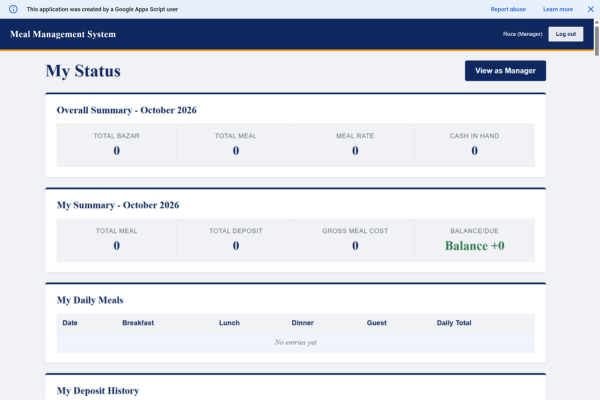
One Manager enters the daily data. Every member gets a simple page where they can see their own meals, deposits, bazar history, and current balance. The app calculates the meal rate and each person’s balance automatically, sends weekly status emails, warns members when their balance runs low, and lets the Manager close a month with one click while keeping the old months in an archive.
Main features: daily meal entry with guest meals (several people can be saved in one go), bazar and deposit tracking, automatic meal rate and balance calculation, next bazar assignment by email, weekly reports and low balance alerts, month end archive, and a mobile friendly layout.
The Challenge
The original setup was a shared spreadsheet. It worked, but members could see (and accidentally change) everything, and everyone needed access to the sheet. The goal was to keep Google Sheets as the data store, but give members a clean, read only page without sharing the sheet or asking them to use a Google account.
A few problems had to be solved along the way:
Login without Google accounts. Members sign in with their email and a one time code. Codes expire after 10 minutes, a single email can receive at most 5 codes a day, and three wrong attempts lock that email for 15 minutes. Sessions last 7 days.
Keeping a public web app safe. Because the page is open to anyone with the link, every server function except the login ones is private. All actions go through one gateway that checks the session token, and only the Manager role can add, edit, or delete anything.
Google Sheets quietly turning month names into dates. Labels like “September 2026” were being converted into real dates, which broke the monthly totals and the past months list. The app now normalizes these values and the setup step formats those columns as plain text.
Speed. The first version read the same sheets again and again, so the dashboard felt slow. Caching each sheet once per request and saving several members’ meals in one batch made it much faster.
A comfortable interface on a phone, for a Manager who enters data every day: member name chips that turn green once saved, a skeleton loading screen, and tables that scroll sideways instead of breaking.
How to Install
Download the ZIP file. It contains four files: Code.gs, Index.html, Stylesheet.html, and JavaScript.html.
- Create a new blank Google Sheet, then open Extensions, Apps Script.
- In the editor, open the default Code file, delete everything in it, and paste in the full contents of Code.gs.
- Click the plus icon next to Files, choose HTML, and create three files named exactly Index, Stylesheet, and JavaScript. Paste in the contents of Index.html, Stylesheet.html, and JavaScript.html into the matching files. Always replace the whole file, never add to the existing text.
- Save the project. Select the function setupSystem from the dropdown at the top and click Run. Approve the permissions when asked. This creates all the sheets the app needs.
- Open the Members sheet and add your members. Each row needs a name and an email. Set Status to Active, set your own Role to Manager, and set everyone else to Member.
- Back in the editor, select installTriggers and click Run. This turns on the weekly email and the low balance alert.
- Click Deploy, New deployment, choose the Web app type, set Execute as to Me and Who has access to Anyone, then click Deploy.
- Copy the link that ends with /exec and share it with your household. Anyone whose email is in the Members sheet can sign in with a one time code.
Whenever you change any file later, deploy again with Manage deployments, Edit, and select New version, otherwise the old version keeps running.