

Overview
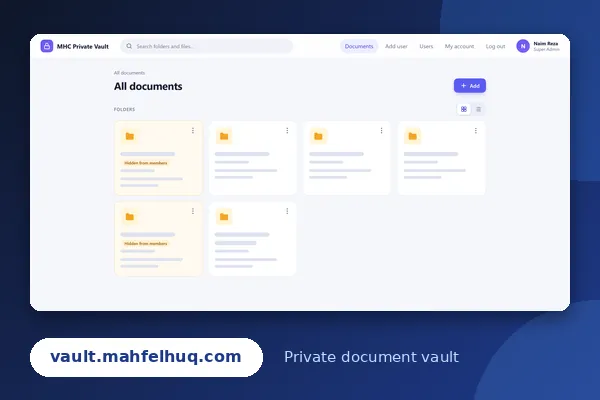
MHC Private Vault is a private document management system for Mahfel Huq & Co. I built it as a fully custom WordPress plugin and it runs at vault.mahfelhuq.com. Staff sign in with their company email, and the vault gives the firm one organized place for its important documents, with control over who can see what.
The screenshot hides folder names and staff names to protect the firm’s information.
What the vault includes:
- Folders and subfolders, each showing how many folders and items it contains
- A grid view and a list view for browsing
- Search across folders and files from the top bar
- An Add button for adding new content
- Folder visibility control: a folder can be marked “Hidden from members” so only administrators see it
- Each folder shows who created it and when
- A menu on every folder for its actions
- User management with roles, including Add user, Users and My account screens, and a Super Admin role
- A clean sign-in with the company email and password, plus a simple human check, and the site tells search engines not to index it
The Challenge
A firm’s documents are sensitive. Some folders are for everyone, and some are only for administrators. The vault had to be private, simple enough for staff who are not technical, and easy for administrators to organize.
Controlling who sees what. I added a visibility setting to every folder, so administrators can hide a folder from members without moving or deleting anything, and a clear label shows which folders are hidden.
Keeping it easy to use. The interface is built from simple cards, with search always visible at the top and a switch between grid and list views, so people can find a folder in a few seconds.
Keeping it private. The vault is for the firm’s own team. Sign-in needs a company email and a password, and the site is hidden from search engines.
What I Did
- Planned the folder structure and the roles for administrators and members
- Built the complete vault as a custom WordPress plugin, so it runs inside WordPress
- Created folders, subfolders and item counts, with grid and list views
- Added search for folders and files
- Built user management: adding users, a users list and each person’s own account page
- Added per-folder visibility, so folders can be hidden from members
- Designed a clean, card-based interface with a simple top bar and clear labels
The vault is private, so it needs an account. You can see its sign-in page at vault.mahfelhuq.com.